AI saves people some time. This course helps you do better work.
This is a course for professionals and their daily tasks. It is built on research and combines best practice for email, meetings and presentations with what AI can do. Use AI to get better at the job, not just faster at it.

14-day money-back guarantee
Full refund, no questions
Full refund, no questions

Certificate of completion
Plus future updates included
Plus future updates included
AI with Dr Amine 14-day money-back guarantee — Full refund, no questions Certificate of completion — Plus future updates included
 No technical skills
Every step is on camera, with prompts and templates ready to use.
 Learn it once
One method that works in Claude, ChatGPT, Gemini and Copilot.


 16 short videos
Under 2 hours in total. A weekend to do it, Monday to use it.
Who this is for
Anyone whose week is mostly email, meetings and slides. Team leads, managers, project managers, analysts, marketers, finance, HR and operations. You do not need to be technical.
It is for you if
You use AI now and then, but the results feel generic.
You are not sure when to trust AI and when to check it.
Email and meetings eat your focus, and you want a better way to handle them.
You want a method that still works when the next new tool arrives.
It is not for you if
You want to write code or build automations.
You are hoping for one prompt that does your whole job.
You want a tour of every AI tool on the market.
AI made people faster. For most, it did not make them better.
2.8%of work hours saved, on average
That is the result from 25,000 workers who used AI at work. About one hour in a 40-hour week.
And in that study, saving a little time did not show up in pay or recorded hours, in any occupation.
Source: Humlum and Vestergaard, NBER Working Paper 33777. nber.org/papers/w33777
Each square is one hour of a 40-hour week. The highlighted square is the average time saved.
Faster is not the same as better. What matters is where AI goes in your week, and what you keep for yourself.
Email shows it well. It pulls you out of your work all day. So the course starts with how you handle email, and then lets AI help with the rest. Craft first, AI second.

Before and after: what changes in your week
";
Same work, same assistant, a different method.
;
From an inbox that runs your day to one you control. Before: You read every email as it lands. You get interrupted again and again, and lose your focus. After: AI filters your inbox and drafts replies. You stay focused, read a short list, and write better emails.
 ;
Meetings
";From meetings that go nowhere to ones that end with a clear next step. Before: (labels: Prep: too long, or skipped / Meeting: unclear next steps / Follow-up: slips) You sit through many meetings that go nowhere. Prep is skipped or takes hours, and the follow-up slips. After: (labels: Prep: 5 to 10 minutes / Meeting: clear agenda / Follow-up: drafted for you) You prep in 5 to 10 minutes, run the meeting better, and the follow-up is drafted for you to check and send. More focused meetings, with better results.
 ;
Presentations
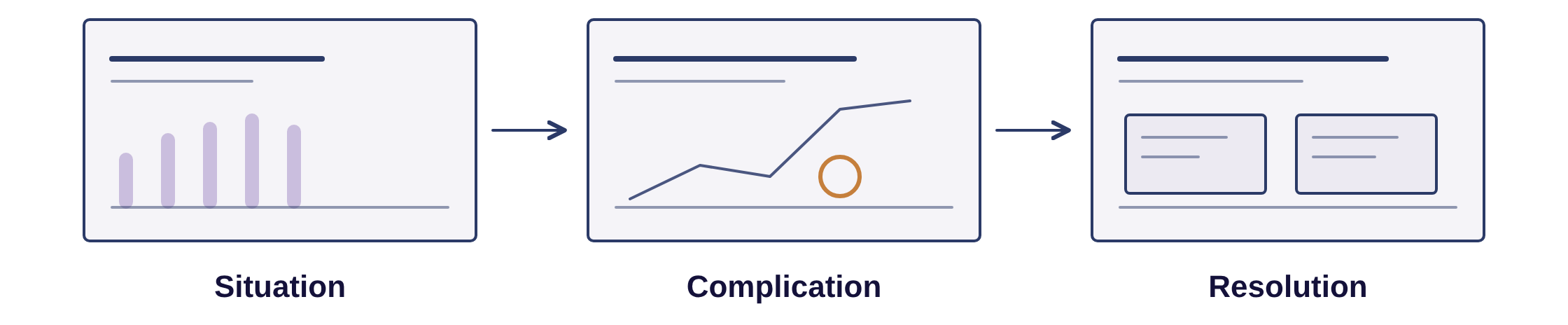
";Storyline graphic labels: Situation, Complication, Resolution Before: You get either a vague AI deck, or a deck that takes you a whole day to make. After: You structure the deck well, using AI and your own insights. The deck makes its case and does its job.
 ;
Who teaches this
Amine Rabehi, PhD I teach, and I use technology to get real work done. I help professionals and organisations use AI well. I have taught and worked with technology for more than 13 years. I have led teams, projects and programs. I use AI in my own companies: events, coworking, SaaS and service businesses. PhD and PMP: I read the studies and I plan work as a process. That is why the course is built on evidence and a clear order of work, and why this page does not promise hours saved.
“The three-question test in Module 1 is a simplified version of the filter I use on paid client engagements.” “I have audited how work gets done in export, insurance, manufacturing and distribution. The same three tasks came up every time.” “I have helped people in ecommerce, logistics, business development, coaching, IT and startups put this into their week. None of them were technical.” “The inbox check and the meeting recaps in this course run my own week.”
Amine Rabehi, PhD
Founder
01 Quality
Learn what good looks like first. Then AI does the work to that standard.
02 Standing
Replies that settle it. Recaps with a clear decision. Decks that tell the story.

03 Scope
When the admin stops slipping, you have time for the work you keep postponing.
What you get
";You learn what is actually needed for your daily job, with templates and guides to apply. It is all backed by studies, and it works on any tool you use.
;
Curriculum
";Module 0: Set up (2 videos). Free
Module 1: Foundations (3 videos). Free
Module 2: Email (4 videos). Free
Module 3: Meetings (4 videos)
Module 4: Presentations (2 videos)
Module 5: Your next workflow (1 video)
;
- Create your account and connect email and calendar
- Organise your folder and learn the two rules
- You keep: setup checklist and SOP folder template
Module 1: Foundations (3 videos). Free
- Identify AI-ready tasks
- Write effective prompts with CORE: Context, Objective, Reference material, Expectations
- You keep: fit-test worksheet, CORE card and template
Module 2: Email (4 videos). Free
- Draft better replies
- Triage your inbox
- Create an AI-assisted email routine
- You keep: reply and triage prompts plus a good-reply checklist
Module 3: Meetings (4 videos)
- Create briefs and agendas
- Capture notes
- Turn meetings into recaps, follow-ups and task lists
- You keep: prep and follow-up templates plus Brightline practice case files
- Shape the story before the slides
- Build in your own template
- Use AI for a manager-style review
- You keep: storyline template and build/review prompts
Module 5: Your next workflow (1 video)
- Apply the same approach to another recurring task in your week
- You keep: certificate of completion
This course is not like the others
I do not know where best to use AI.
Module 1 gives you a test. Three questions you run on your own week: is this work for AI or for me, is it worth changing how I work, can AI actually do it. You leave knowing where to start.
My company only allows Copilot, or blocks Claude.
The method does not depend on the tool. The CORE framework, the check step, and the split between what you own and what AI does work in any assistant. The demos are recorded in Claude, and a few steps, such as connections, depend on what your assistant offers.
I cannot paste company data into it.
Every connection starts with read and draft access, and you give it only what it needs. You also learn to treat what is inside an email as information, never as instructions.
The results sound like AI, and everyone can tell.
That is exactly what the craft layer fixes. In a study of about 1,100 working professionals, 83% saw a sender as sincere when the message had light AI help. With heavy AI help, that fell to between 40% and 52%. You learn how to use AI without losing your voice. Source: Cardon and Coman, International Journal of Business Communication. https://news.ufl.edu/2025/08/writing-ai-work/
There is free content on all of this.
Free videos show one tool, once. This gives you the process: a framework that works on any assistant, so you save time and your work gets better. And you can start free.
Do I need a paid plan?
You can follow along on a free account to start.
Will I actually finish?
16 short videos, under 2 hours. Do it over a weekend and use it from Monday.
Everything included
You are early, so you get the lowest price this course will have. In return I ask for early feedback, and a before and after of how you use AI.
$27
The course, regular price after the founding offer $49; 45-minute session with me, my consulting rate $150; Total value $199; Your founding price $27. The founding price and the free session are for the first 30 buyers. Book your session within 30 days of joining. 14-day money-back guarantee. If it is not for you, email me within 14 days and I will refund you in full. No questions.
Founding price: $27. Certificate of completion. Future updates included.
-
16 short videos, under 2 hours
-
Prompt pack and learning recap
-
Checklists and templates
-
Certificate of completion
-
Free future updates
-
A free 45-minute session with me to apply this to your own work
Created with